We remain fully operational. Our teams are working around the clock to ensure your deliveries continue safely.

DOWNLOAD THE APP


Copyright © 2025 Desertcart Holdings Limited
DOWNLOAD THE APP


Buy anything from 5,000+ international stores. One checkout price. No surprise fees. Join 2M+ shoppers on Desertcart.
Desertcart purchases this item on your behalf and handles shipping, customs, and support to Moldova.
🎹 Elevate your pedal game—convert, customize, and conquer every beat!
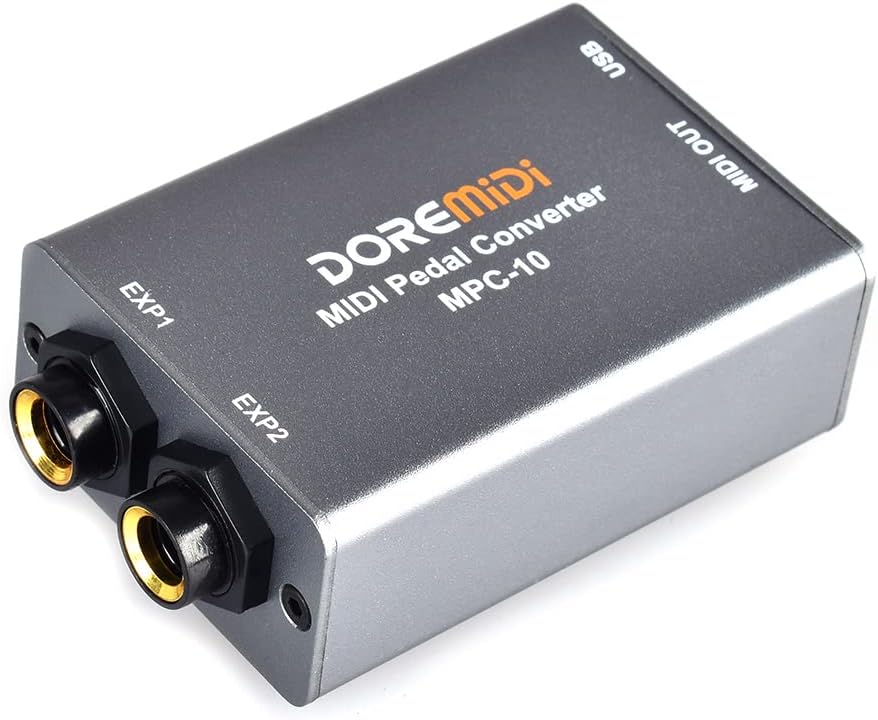
The DOREMiDi MPC-10 is a compact, metal-built pedal converter and expander that supports dual pedal connections with automatic detection. It offers versatile compatibility with various pedal types and devices via USB MIDI and MIDI output, enabling seamless integration with computers and instruments. Its advanced software allows deep MIDI message customization, while firmware updates ensure ongoing enhancements, making it an essential tool for modern musicians seeking flexible, professional-grade pedal control.


| ASIN | B0BZ87CVJ7 |
| Best Sellers Rank | #10,537 in Musical Instruments ( See Top 100 in Musical Instruments ) #55 in Keyboard Pedals & Footswitches |
| Brand | DOREMiDi |
| Color | Silver |
| Compatible Devices | Desktop, Monitor, Laptop, Printer, Projector, Game Console, Headset, Positive Polarity Expression Pedals, Reverse Polarity Expression Pedals, Sustain Pedals, Double Switch Pedals, Electronic Drum Hats |
| Connector Type | DIN |
| Customer Reviews | 3.8 3.8 out of 5 stars (107) |
| Finish | Matte |
| Item Dimensions | 2.76 x 1.73 x 0.94 inches |
| Item Type Name | Signal Converter |
| Item Weight | 0.15 Kilograms |
| Manufacturer | DOREMiDI |
| Model Number | MPC-10 |
| Number of Items | 1 |
| Number of Ports | 3 |
| Package Quantity | 1 |
| Power Plug Type | No Plug |
| Specific Uses For Product | Musical performance, music production |
| Unit Count | 1.0 Count |
| Warranty Description | 30 |
L**N
Tiny and works well
No issues with configuration or with use on PC or iOS. The software is good. It's had a lot of updates, especially to fix Mac bugs. You can customize everything, even by setting CC curves natively. It supports drum kit pedals. The software has a built-in MIDI monitor, including values and an animation which displays the state of your pedals. Documentation is quite good. Easy, clear, and above average experience overall. Solid metal build, yet tiny and weightless. This has completely changed the way I look at MIDI keyboards. Every single keyboard I have can be played with a mod pedal now, including my Clavinova upright and my mini keys. A match made in heaven on both counts. Very useful converter.
R**M
Great device
Arrived as described. No Problems. Would purchase from seller again. Device worked exactly as described. Anyone looking for a less expensive alternative to devices that advertise to do the same thing, this is worth it.
M**S
Works well, but default settings aren't all that useful
Got this MPC-10 so I could use an expression pedal for recording MIDI with Logic Pro. (My keyboard controller only has a sustain pedal input.) It works just fine for that. But the factory settings can be a little confusing. And the app to configure it is a little quirky (though they've fixed a lot of the bugs mentioned in earlier reviews). More details: - The MPC-10 maps expression pedals to MIDI CC#21 by default. CC#21 is "undefined"—some instruments might treat it as vibrato, but most will probably ignore it. A better choice would be CC#11 "expression". You can either remap this in your DAW (e.g., Logic's MIDI FX "Modifier" plugin) or use DoReMidi's app to reconfigure the MPC-10 to send a different CC. - It maps single foot switches to MIDI CC#64 "sustain" by default. - It maps dual foot switches (or two single foot switches connected through a 1/4" TRS splitter) to CC#64 "sustain" and CC#66 "sostenuto" by default. - If you plug in two of the same type of pedal (one in each input), *both* will have the same behavior by default. Two expression pedals: both CC#21. Two single foot switches: both CC#64. Two dual foot switches: each pair will have one CC#64 and one CC#66. The only way to change this—so you get a different CC from each pedal—is in their config app. - All controller messages are sent on MIDI channel 1 by default. (You can change this in their app.) - It detects pedal type when it powers up. If you change pedals while it's on, it might get confused and you'll need to power cycle it. Set expression pedals somewhere in the middle or it might mistake them for foot switches. - The detection seems to work pretty well: it handles N/O and N/C single foot switches, and expression pedals with TRS connectors where either RS or TS is the fixed resistance. But it seems like dual foot switches *must* be N/O or it will get really confused. - It gets power from its USB-C connection (so for an iPad you'll also need a powered USB hub). It shows up as a class compliant MIDI device. About DoReMidi's configuration app: - I had trouble finding the software on their web site, which seems designed for extremely wide screens (and likes to change on rollover rather than click, so is really hard to navigate). The downloads section is at the right side of the top nav bar, hiding behind a pale gray arrow. You only need the Pedal Config Tool. - The app ran and mostly worked fine for me on macOS Sequoia 15.4. They seem to do regular app updates. Many complaints from earlier reviews have been fixed: the app is signed (so you don't need to bypass macOS security), and text is readable (though small) white on a dark gray background. - There's a "Set" button at the very bottom, and you have to click this after each change to see the effects. (I missed this at first.) - One bug: when you select a connected pedal in the Pedal Number popup, the settings area on the left doesn't always update to show the current settings for that pedal number, which gets really confusing. But the MIDI event log on the right seems accurate, so with a little poking around I was eventually able to get the behavior I wanted. (This is with Pedal Config Tool v3.0.4.) - The app can apply a curve to the expression pedal mapping, and can set min, max, and a fixed offset ("gain"). The default curve spreads out the pedal range for low values and compresses it for high ones. (I changed this to linear.) - The app has a bunch of other options for configuring pedals: it can map an expression pedal to pitch bend (works) or channel pressure (aftertouch—though I wasn't able to get this to work). It can also send MIDI note events in response to a pedal, and can send up to 16 different events for each pedal (I haven't tried any of that). - The MPC-10 remembers its settings when powered off, so once you've configured it you might not need the app much. The app can also save and load different configurations from files on your computer (though I haven't tried that). - The Pedal Config Tool also handles firmware upgrades, so you don't need their Upgrade Firmware Tool or any firmware downloads (which seem to be published in Windows-only rar format). The instructions say to put to put your MPC-10 in firmware upgrade mode, but don't tell you how to do that. Here's how: unplug USB power, then use a paperclip to hold in the recessed reset button (near the MIDI Out connection) while plugging USB back in. The power light will blink rapidly to indicate upgrade mode. Then in the app, choose Setting > Firmware Upgrade, and it will check for updates and download and install any available. - From what I can tell, the "Factory Reset" command doesn't actually do anything. I'm using the MPC-10 successfully with two of these Nektar expression pedals , and with several different foot switches I had sitting around and some generic 1/4" TRS splitters. [This review is for DoReMidi MPC-10, purchased in April 2025, sold by DRMD-LLC and shipped by Amazon. I paid for the product myself, and I don't accept gifts for reviews.]
R**S
great in concept, but absolutely NOT plug and play, and DID NOT WORK AT ALL- RETURNED
I so much wanted this to work. However, using it with a mac (osx 14.6.1 with Airbook silicon), plugging it in with USB, it was not recognized by my computer nor my DAW (logicPro). The microscopic (is 2 point text possible?) manual showed a web site where I went to download software. However, the software is NOT verified by apple and NOT something that can be installed on my mac. Please... if you have hardware that you want customers to be able to use, take some time in setting up your software correctly and do it through apple, etc. thank you.
J**N
Great product
This is a really excellent solution for me. I am connecting the DBA Photo Modulator to the SOMA Labs Meta Conformer, so that I can simultaneously control my Moog Minitaur and my Boss MD-200 with this and with my Arturia Keystep. It works! Now I can use the ribbon controller and get one style of modulation, but I can use this and have my photo sensor ready on the draw to hold against a light for modulation. I bought one of these for and my brother both.
S**D
Two-fisted Review
Two-fisted review.... First the bad and then the recovery. First unit received would not communicate to DOREMIDI pedal config tool, after the config tool instructed to update the firmware. Basically the firmware update process bricked the unit, Returned the unit to Amazon and requested a replacement. Replacement unit arrived. Upgraded the firmware as before and the unit worked flawlessly. Performs exactly as advertised. In the end, I'm very satisfied but disappointed with all the churn to get a working unit.
R**N
It simply works!
It works! There are virtually no other products that can do what this does so simply.
M**.
Did not work for me. Too Late to return. Test it fully within the return period.
Did not work for me. Too Late to return. I have a Morley Volume Plus that I was hoping to use as an expression controller for Plugins. 1st- It won't recognize it as an Exp Pedal. It sees it as a HH pedal. I tried a HH pedal also, and it saw that as a Switch Pedal. I later ordered a Nektar and it worked with the DoreMidi but that defeated the whole point of trying to use my high quality metal frame (not Plastic) Morley Pedal. I can plug the Nektar directly into my keyboard Controller so. this is now a paper weight. Software is buggy, particularly if you are have to use an older version. (I'm on OSX 12.6.7) I did contact Customer Support and they said: Thanks for contacting us and using DOREMiDi products. Based on your description, the Morley Volume Pedal looks like a powered effects pedal, not an expression pedal, and may not be suitable for the MPC-10. My advice to anyone buying one is to make sure you test it fully within the return period.
C**.
È un ottimo prodotto, facile da configurare, con esso ho potuto connettere un pedale sustain alla mia tastiera che non aveva la presa dedicata. Da un lato l' ingresso per collegare 2 pedali. Dall' altro l' alimentazione USB( io l' ho collegata al computer) e l' uscita midi( anche questa l' ho collegata al computer con un adattatore da midi a USB). Funziona perfettamente. Il led lampeggia sino a quando non riconosce il dispositivo e poi è fisso.
K**R
Works without issue so far. It's plug-and-play. Seems sturdy.
A**R
Fait le boulot de temps en temps quand ça lui chante. Configuré correctement, fonctionne parfois pendant quelques jours, parfois une seule journée. Lorsqu'il arrête de fonctionner, il suffit de relancer l'utilitaire et de reconfigurer. Enfin seulement parfois, parce que d'autres fois ça refuse de fonctionner tout court. L'utilitaire est aussi vraiment pas intuitif même pour quelqu'un qui est habitué au MIDI. Si j'ai payé 50€, c'est pas pour avoir a faire du troubleshooting 3 fois par semaine. Does the job from time to time when it feels like it. Configured correctly, it sometimes works for a few days, sometimes only for one day. When it stops working, you just have to restart the utility and reconfigure. Well, only sometimes, because other times it refuses to work at all. The utility is also really not intuitive, even for someone familiar with MIDI. If I paid €50, it's not to have to do troubleshooting three times a week.
A**P
Works well.
L**O
Todo acorde a lo indicado
Trustpilot
1 month ago
3 weeks ago